System Containers — Full OS in a Container
System Containers
A full operating system, inside a container
System Containers combine the portability and density of containers with the full autonomy of a virtual machine. Install packages, run daemons, configure your OS freely — all inside a portable container you can deploy on any cloud or bare-metal server.
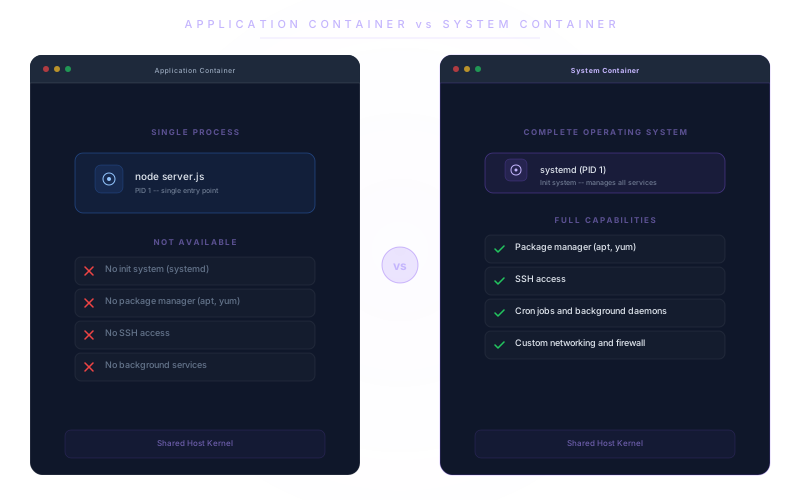
What is a System Container?
More than a microservice container
Traditional containers package a single process — one service, one entry point, no init system. System Containers package an entire operating system: init system, package manager, SSH access, background services. Everything you would expect from a server, with the deployment speed and portability of a container — and none of the hypervisor overhead.
Full OS autonomy
Install any package, run any daemon, configure as if it were your own server. No restrictions from a minimal container runtime. Your container, your rules.
Container portability
Deploy on any cloud provider or bare-metal server. Move workloads between providers without re-architecting. The same container runs everywhere LayerOps does.
No hypervisor overhead
Near-native performance with no VM boot time and no wasted memory on a guest kernel. System Containers start in seconds, not minutes.
Isolation & security
Each System Container is isolated at the OS level. Role-based access control defines who can access what. Combine the security of isolation with the efficiency of containers.
Full configuration freedom
systemd, cron jobs, custom networking, local firewalls, background services — configure your environment exactly as you would on a dedicated server.
No vendor lock-in
Standard container format. Export and run elsewhere at any time. System Containers extend the portability guarantee you already get with application containers.
Who benefits from System Containers?
Legacy application migration
Move traditional server-based applications to containers without rewriting them. If it runs on a Linux server, it runs in a System Container — same packages, same configuration, same behavior.
Development & testing environments
Spin up full OS environments for testing, CI/CD pipelines, or developer sandboxes in seconds. Every developer gets an isolated, reproducible environment identical to production.
Regulated industries
Industries requiring full OS-level audit trails, compliance tooling, and custom security configurations. Run your compliance agents, log collectors, and security scanners inside the container.
System Containers vs. traditional VMs
| Traditional VMs | LayerOps | |
|---|---|---|
| PerformanceStartup time | Minutes | Seconds |
| Resource overhead | High — full guest kernel + hypervisor | Low — shared host kernel |
| Density per host | 10–20 VMs typical | 100+ containers possible |
| PortabilityCross-cloud deployment | Complex — image conversion per provider | Native — same container runs everywhere |
| Export & reversibility | Provider-specific image formats | Standard container format |
| ManagementLoad balancer & SSL | Separate setup per provider | Built-in, automatic |
| Monitoring & alerting | Install and configure separately | Built-in |
| Snapshot management | Manual snapshots, growing storage costs | Automatic, no overhead |
| CapabilitiesFull OS access | ||
| Package installation | ||
| SSH access | ||
| Cost efficiency | Higher — dedicated resources per VM | Lower — shared kernel, higher density |
Help us shape System Containers
System Containers are coming soon to LayerOps. We're building this feature based on real user needs — and we want yours.
Tell us about your use case, the workloads you'd run, or the problems System Containers would solve for you. Interested in a short interview with our product team? We'd love to hear from you.